
A YouTube thumbnail has a surprisingly difficult job.
It has to communicate an idea in a tiny space.
It has to stand out among dozens of other videos.
And most importantly, it has to make someone curious enough to stop scrolling.
That’s why thumbnail design isn’t just about making something beautiful.
It’s about human attention and decision-making.
And with AI making it easier to generate visual concepts, understanding the psychology behind those visuals becomes even more important.
Your Brain Doesn’t Read a Thumbnail Like a Poster
When you look at a poster, you might spend several seconds reading it.
YouTube is different.
People are scrolling quickly.
Their brains are constantly filtering information and asking:
“Is this relevant to me?”
“Is this interesting?”
“Should I stop?”
A thumbnail needs to communicate its core idea almost instantly.
This is why visual hierarchy matters so much.
1. The First Element Gets the Most Attention
When everything in a thumbnail has the same visual importance, nothing feels important.
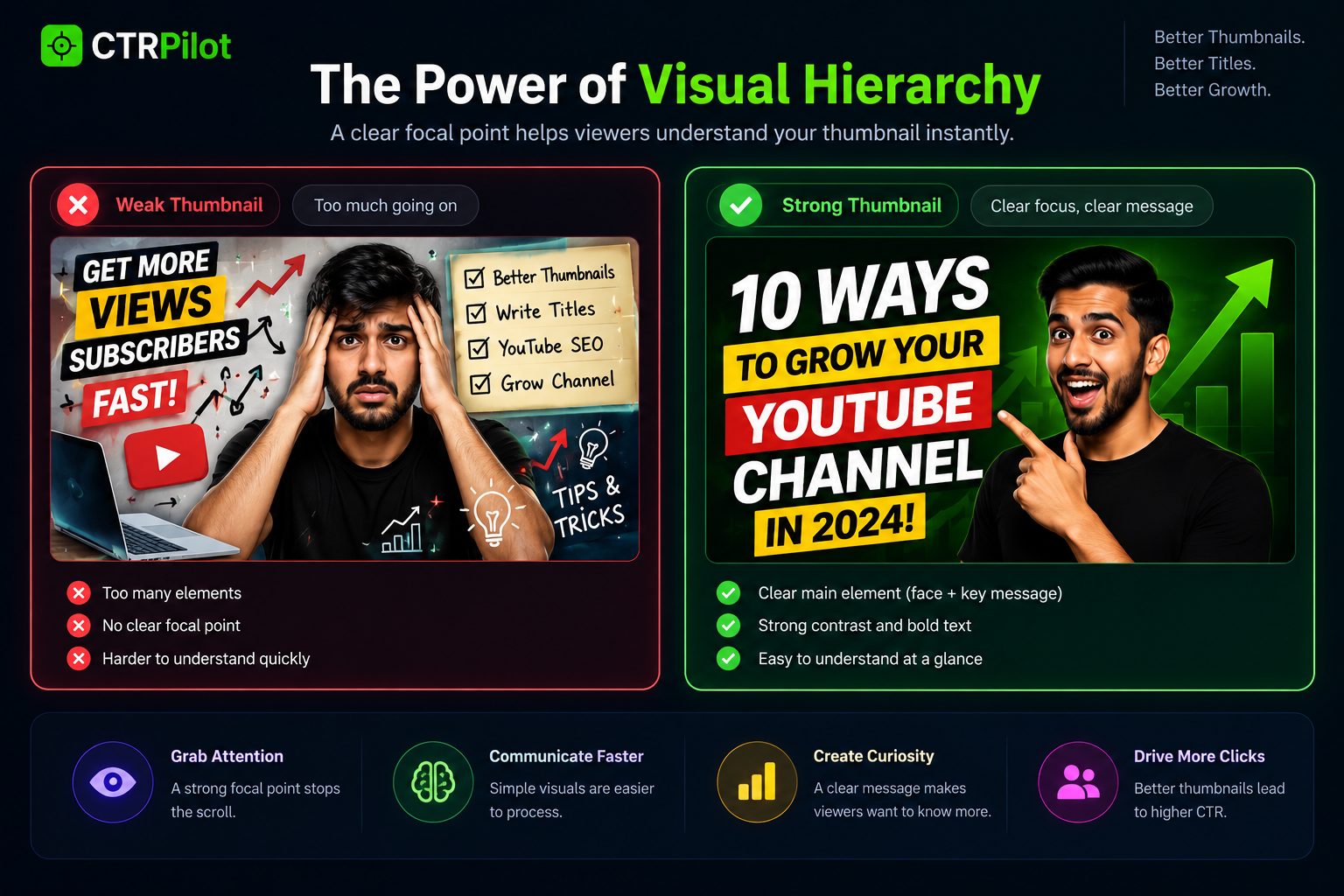
A strong visual hierarchy helps viewers understand the most important element of a thumbnail instantly.
A strong thumbnail usually has a dominant element.
It could be:
A face
A product
A number
A surprising object
A result
A short phrase
The goal is simple:
Give the viewer somewhere to look first.
Once the first element catches attention, supporting elements can provide additional context.
2. Faces Naturally Create Emotional Context
Human faces are powerful visual elements.
A facial expression can communicate emotion faster than a sentence.
Excitement.
Surprise.
Confusion.
Fear.
Confidence.
Curiosity.
That’s why creators often use expressive faces in thumbnails.
But the important part isn’t simply adding a face.
The expression should support the video’s story.
A surprised face next to a dramatic result tells a different story from a calm face next to a tutorial.
3. Contrast Helps You Stand Out
Imagine a page filled with thumbnails.
If every thumbnail has similar colors, shapes, and brightness, it’s difficult for any single one to stand out.
Contrast creates separation.
You can use contrast through:
Light vs. dark
Large vs. small
Bright vs. muted
Simple vs. complex
Subject vs. background
The goal isn’t to make everything extremely colorful.
The goal is to make the important elements easy to distinguish.
4. Less Text Can Be More Powerful
One of the most common thumbnail mistakes is trying to explain too much.
A creator might add a full sentence because they want to make the topic clear.
But a thumbnail isn’t an article.
It doesn’t need to explain everything.
Instead of:
“Here Are 10 Things You Need to Do to Grow Your YouTube Channel”
A thumbnail might communicate the same concept with:
10 GROWTH SECRETS
The title can provide the rest of the information.
This creates a division of responsibility:
Thumbnail → Attention
Title → Context
Video → Value
5. Curiosity Creates Momentum
A thumbnail can be informative without being completely explanatory.
Sometimes leaving something unanswered makes the viewer more interested.
For example:
Before → After
$0 → $10K
Old → New
Problem → Result
These visual structures naturally create a question:
“What happened in between?”
That question can encourage the viewer to investigate further.
6. Familiar Patterns Are Easier to Understand
People recognize patterns quickly.
A comparison.
A large number.
An arrow pointing toward something.
A highlighted object.
A before-and-after transformation.
These visual structures are familiar to viewers.
That doesn’t mean every thumbnail should look identical.
It means that using recognizable visual language can make a thumbnail easier to process.
7. The Thumbnail and Title Should Complete Each Other
One of the most interesting parts of YouTube packaging is that the thumbnail and title don’t need to communicate the exact same message.
They can work together.
For example:
Thumbnail:
FROM 0 → 10K
Title:
The YouTube Strategy That Helped Me Reach 10,000 Subscribers
The thumbnail creates the visual hook.
The title explains the context.
Together, they create a more complete message.
8. Design Should Match the Audience
A gaming channel and a finance channel shouldn’t necessarily use the same visual language.
A children’s channel might use playful visuals.
A technology channel might use clean interfaces.
A business channel might use charts, numbers, or strong typography.
Good thumbnail design isn’t only about following trends.
It’s about understanding the audience you’re communicating with.
Where AI Fits Into Thumbnail Design
This is where things get interesting.
AI can make it dramatically easier to explore different visual directions.
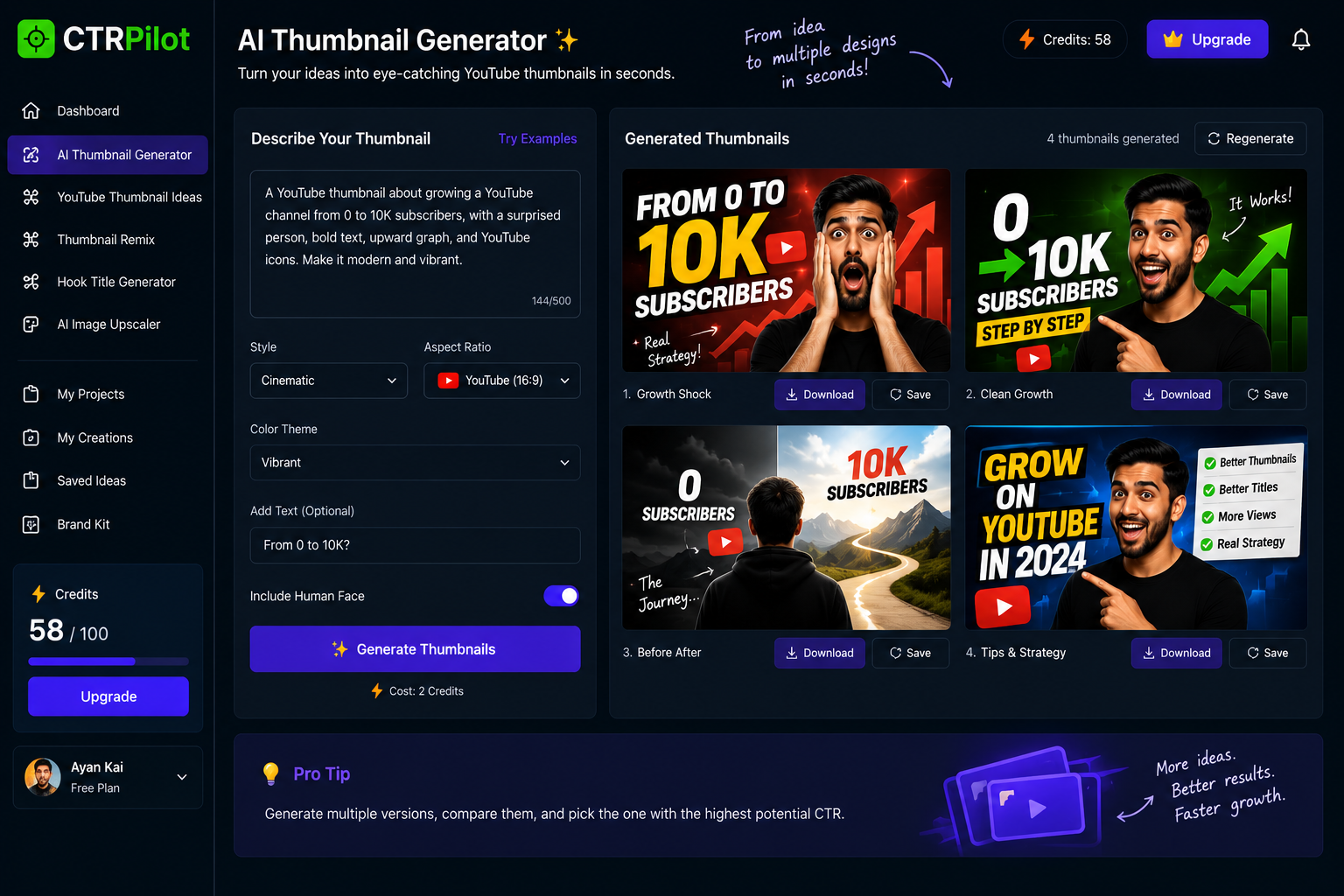
AI can help creators quickly explore multiple visual directions from a single video idea.
Instead of manually designing every concept, creators can start with an idea and generate multiple possibilities.
For example:
Video idea:
How I Built a SaaS Product
Possible thumbnail directions:
Concept A — Result
Show the finished product with a large growth number.
Concept B — Journey
Show the transformation from idea to product.
Concept C — Problem
Show the challenge that needed to be solved.
Concept D — Curiosity
Highlight an unexpected result.
The creator can then decide which story best represents the video.
AI Should Expand Ideas, Not Replace Judgment
This is an important distinction.
Generating 20 thumbnails doesn’t automatically mean one of them will be good.
AI can provide possibilities.
But the creator still needs to ask:
Does this represent the video?
Is the message clear?
Does it match the audience?
Is the visual hierarchy strong?
Does it work with the title?
Does it feel authentic?
AI makes exploration faster.
Human judgment makes the final choice better.
This Is One of the Ideas Behind CTRPilot
This philosophy is part of why I’m building CTRPilot.
The goal isn’t simply to generate random attractive thumbnails.
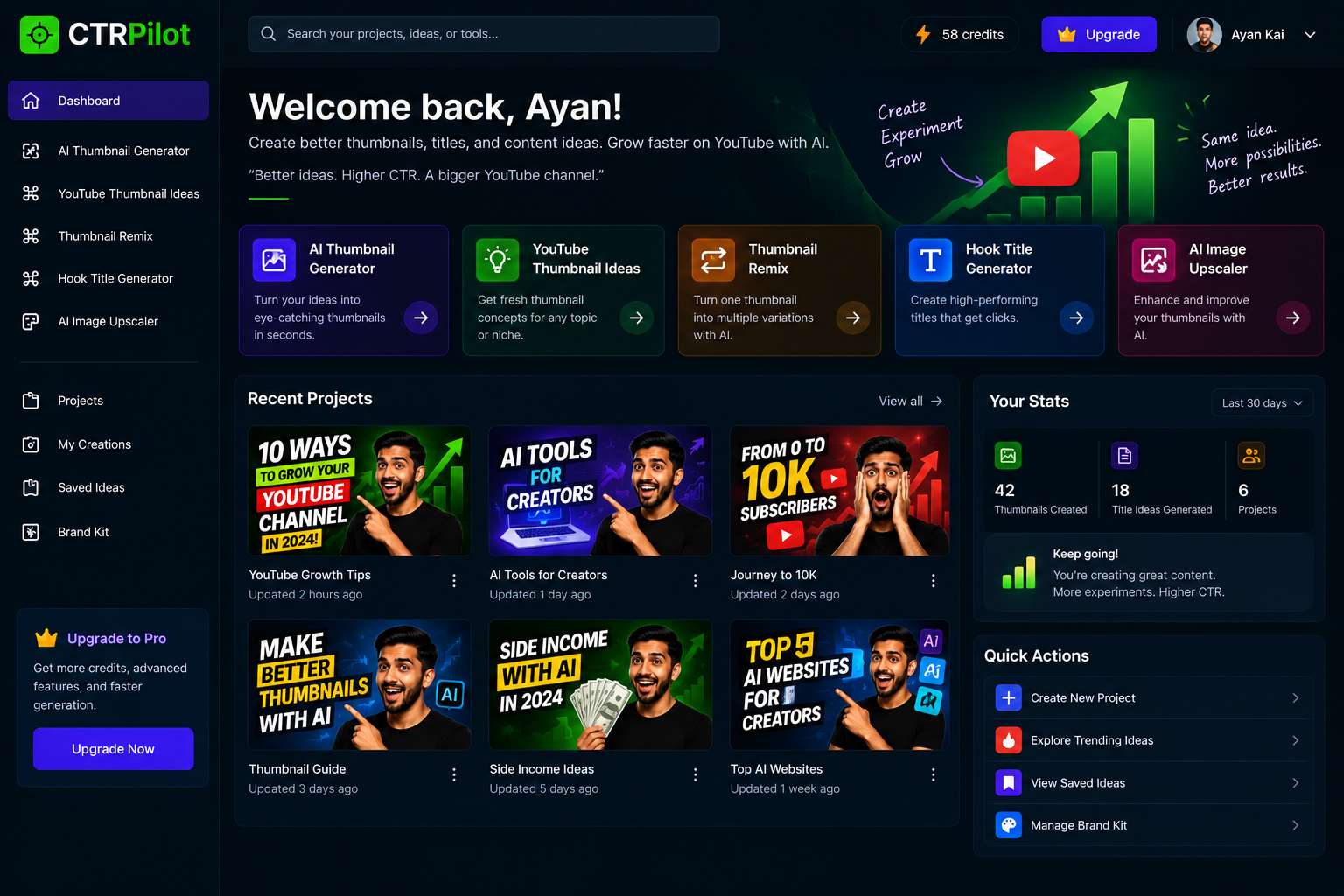
CTRPilot brings thumbnail generation, ideas, remixing, title generation, and image enhancement into one workflow.
It’s to help creators explore different ways of presenting the same content.
CTRPilot brings together tools such as:
AI Thumbnail Generator
YouTube Thumbnail Ideas
Thumbnail Remix
Hook Title Generator
AI Image Upscaler
Project organization
The workflow starts with the creator’s idea.
AI helps explore the possibilities.
The creator decides what makes the most sense.
Remixing Is Useful When the First Idea Isn’t Enough
Sometimes you already have a decent thumbnail.
You don’t need to start over.
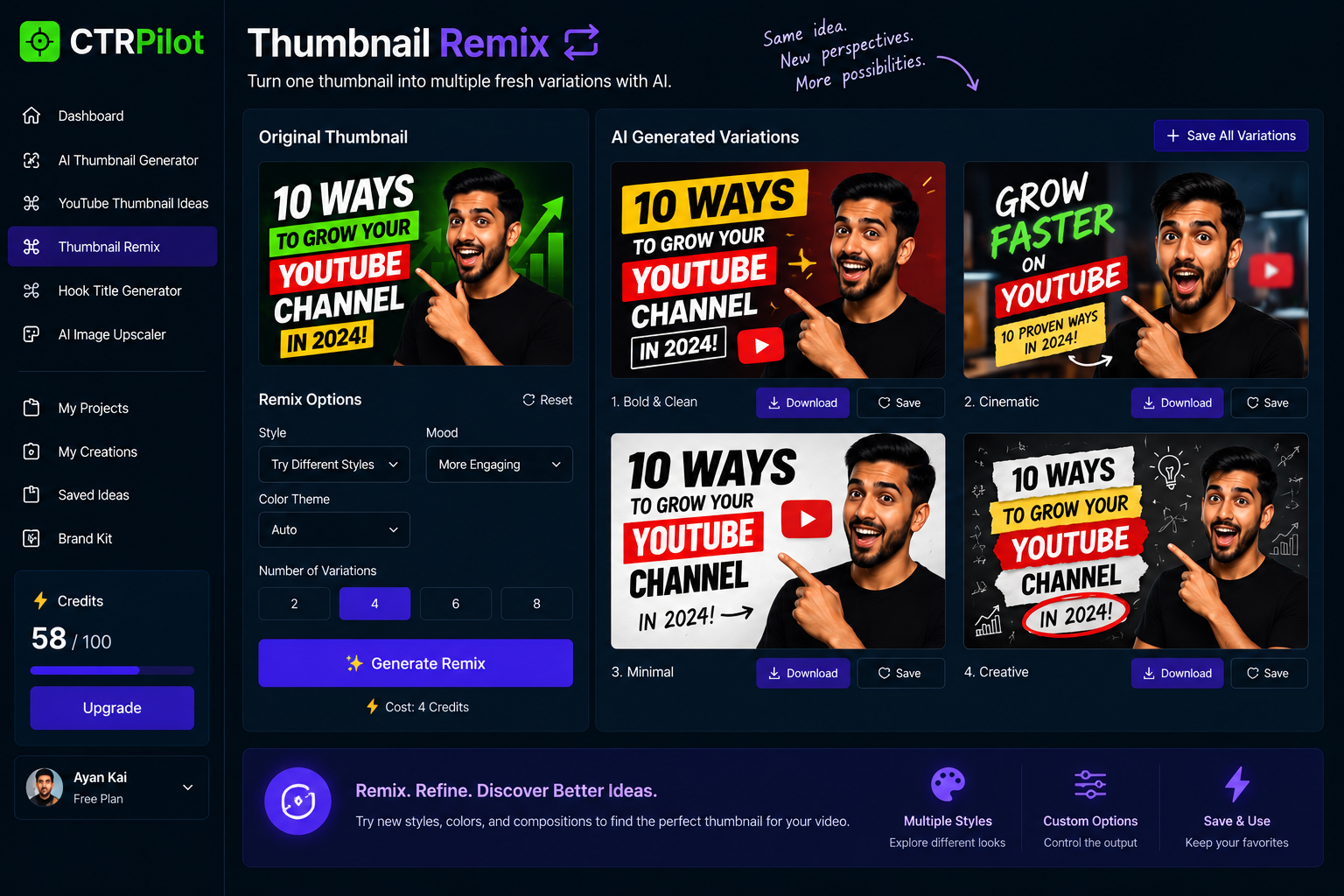
Remix existing concepts to explore new compositions, styles, and visual directions.
You just want to see what else it could become.
Maybe the composition could be cleaner.
Maybe the colors could be stronger.
Maybe the subject could be more prominent.
Maybe the visual style could better match the audience.
That’s where remixing becomes useful.
One concept can become several different creative directions without rebuilding everything from scratch.
Think Like a Viewer
Before publishing a thumbnail, try looking at it as if you’ve never seen the video before.
Ask:
What do I notice first?
Then:
What do I think this video is about?
Then:
What question does the thumbnail make me ask?
Finally:
Does the title give me a reason to click?
These questions can reveal problems that are difficult to see when you’ve been staring at the design for an hour.
A Simple Thumbnail Psychology Checklist
Before publishing, check these five things:
1. One clear focal point
Don’t make every element equally important.
2. Strong visual contrast
Make the important elements easy to recognize.
3. Minimal text
Use the thumbnail to create attention, not explain everything.
4. A clear emotional or visual hook
Give the viewer a reason to look twice.
5. Thumbnail + title alignment
Make sure they work together rather than repeating each other.
The Goal Isn’t to Trick the Viewer
There’s an important difference between curiosity and clickbait.
A good thumbnail creates curiosity about something the video actually delivers.
Clickbait creates an expectation the video can’t fulfill.
The first can build trust.
The second can damage it.
So the best thumbnail isn’t the one that gets attention at any cost.
It’s the one that gets attention for the right reason.
Final Thoughts
YouTube thumbnails sit at the intersection of design, psychology, storytelling, and marketing.
That’s what makes them so interesting.
A small image can influence whether someone notices your video, understands its topic, and becomes curious enough to watch.
AI can make the creative exploration process faster.
But understanding the viewer still matters.
The future isn’t simply about generating more thumbnails.
It’s about helping creators explore better ideas and make better decisions.
That’s the direction I’m exploring with CTRPilot.
Better visual ideas. Faster experimentation. Smarter creative decisions.
👉 Explore CTRPilot: CTRPilot