
The best fonts for YouTube thumbnails are heavy, condensed sans-serifs: Anton, Bebas Neue, Impact, Montserrat Black and Oswald Bold cover most channels, and all of them are free. What matters more than the exact font is how you set it: three to five words, huge, with a thick outline or shadow so it reads on a phone screen.
Below you'll find 12 fonts that hold up at small sizes, which ones are free for commercial use, the sizes and outline settings to use, pairings by niche, and the fonts to avoid.
What makes a font work on a thumbnail
A thumbnail is usually seen at a fraction of its real size: in the mobile feed, in suggested videos beside another video, and on TV home screens from across the room. A good thumbnail font survives that shrink. Look for four things:
- Heavy weight. Bold, Black or ExtraBold. Thin strokes vanish when the image is scaled down.
- Condensed or compact letters. Narrow letters let you set fewer words much larger in a 16:9 frame.
- Simple, open shapes. Big counters (the holes in a, e, o) and no hairline details, so letters don't fill in.
- Instant recognition. Viewers decide in a moment. Plain shapes beat decorative ones.
The 12 best fonts for YouTube thumbnails
| Font | Style | Cost and where to get it | Best for |
|---|---|---|---|
| Anton | Ultra-condensed, heavy | Free (Google Fonts) | Gaming, commentary, news, any big 1–3 word hook |
| Bebas Neue | Tall, condensed, all caps | Free (Google Fonts) | Tech, finance, documentaries, clean modern channels |
| Impact | Condensed, very heavy | Preinstalled on Windows and most Macs | Classic reaction and challenge thumbnails |
| Montserrat (Black / ExtraBold) | Wide geometric sans | Free (Google Fonts) | Education, business, tutorials |
| Oswald (Bold) | Condensed sans | Free (Google Fonts) | Sports, fitness, listicles |
| Archivo Black | Wide, very heavy | Free (Google Fonts) | Podcasts, interviews, bold single words |
| Poppins (Bold / Black) | Rounded geometric | Free (Google Fonts) | Lifestyle, vlogs, beauty |
| League Spartan | Geometric, heavy | Free (Google Fonts) | Productivity, self-improvement |
| Luckiest Guy | Playful, chunky | Free (Google Fonts) | Kids, family, Minecraft and Roblox |
| Bangers | Comic-book caps | Free (Google Fonts) | Gaming, comedy, reactions |
| Futura (Heavy / Extra Bold) | Geometric | Paid (Adobe Fonts with Creative Cloud, or a desktop licence) | Premium brand look, travel, design |
| Proxima Nova (Black) | Modern geometric | Paid (Adobe Fonts) | Corporate, SaaS, finance |
Fonts on Google Fonts are released under open licences (mostly the SIL Open Font License), which allow commercial use, including monetised videos. For anything else, check the licence before you use it on a channel that earns money.
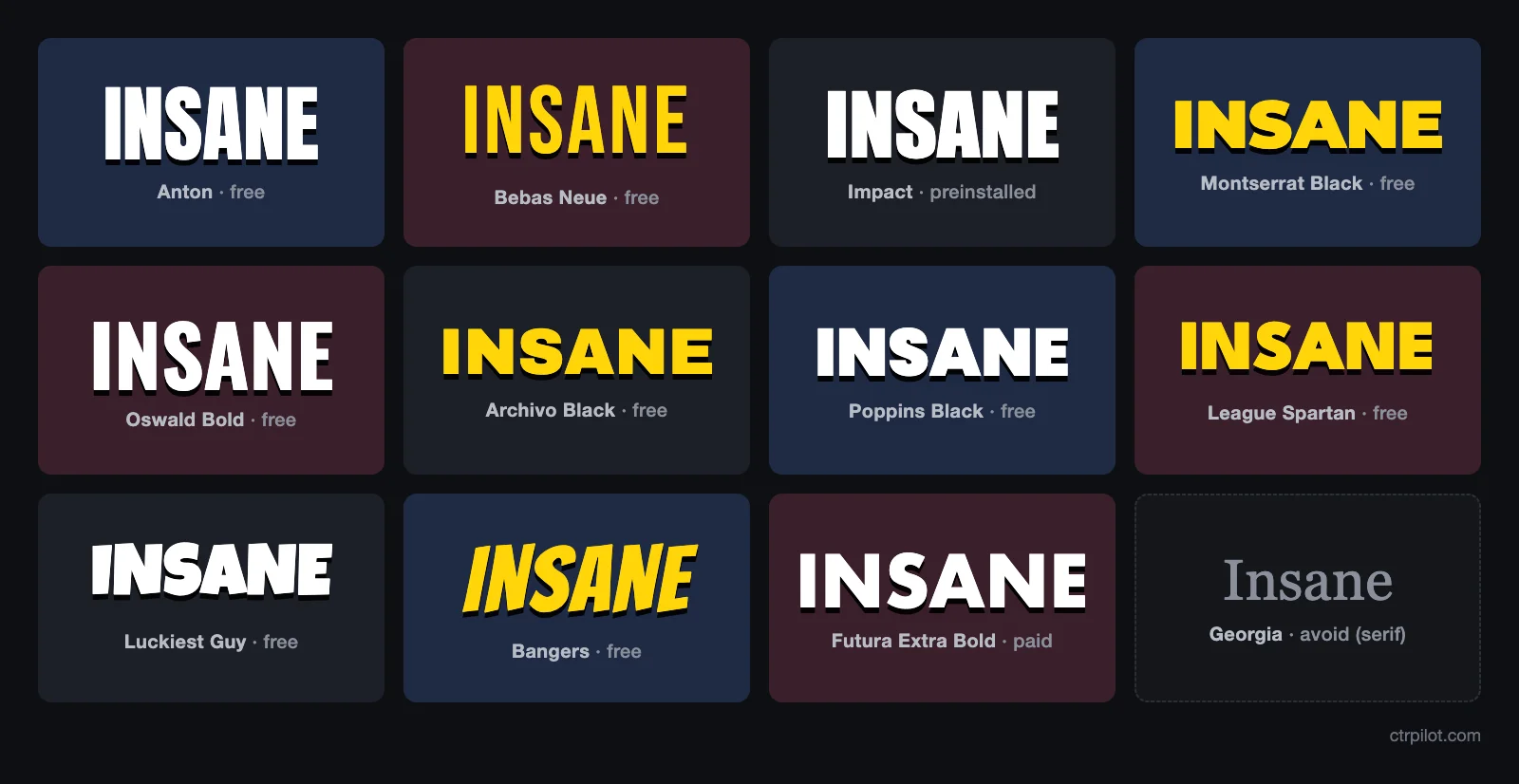
Anton
If you only install one font, make it Anton. Its very narrow letters let one or two words fill half the frame, and it stays sharp at feed size. Pair it with a smaller Montserrat Bold for a second line.
Bebas Neue
All caps, tall and clean. Bebas Neue looks less shouty than Impact, which suits tech, finance and explainer channels. Add letter-spacing of +2 to +5% so the tall letters don't crowd each other.
Impact
The original thumbnail font, and still effective. Because it's everywhere, it can look generic, so give it your own colour treatment or outline to stand out.
Montserrat Black
Wider and friendlier than the condensed options. Use it when your text is a short sentence rather than one word, as tutorial channels often need.
Luckiest Guy and Bangers
The two best “fun” fonts. Chunky shapes survive shrinking far better than script or handwriting fonts, so these are the safe way to look playful.
Size, outline and spacing: settings that work
These are working rules of thumb for a 1280×720 canvas. Scale them up proportionally if you design at YouTube's recommended 3840×2160.
| Setting | Rule of thumb |
|---|---|
| Word count | 3–5 words max; 1–3 is often better |
| Letter height | Main words at least 1/5 of the image height (about 150 px or more at 720 px tall) |
| Lines | 1–2 lines; never 3 |
| Outline (stroke) | 6–12 px dark stroke on light text, or the reverse |
| Drop shadow | Hard shadow, offset 6–10 px, 80–100% opacity |
| Letter-spacing | 0 to +5% for condensed fonts; tight is fine for Impact |
| Safe area | Keep text out of the bottom-right corner, where YouTube shows the video length |
How to pick a font for your niche
- Gaming: Anton, Bangers or Luckiest Guy, bright fills with thick black outlines.
- Finance, business and tech: Bebas Neue or Proxima Nova, white or yellow on a dark background.
- Education and tutorials: Montserrat Black for the hook, Montserrat Bold for a second line.
- Vlogs, lifestyle and beauty: Poppins Bold or Futura Heavy, softer colours, shadow instead of a hard outline.
- Fitness and sports: Oswald Bold or Anton, italic or slanted for energy.
Pick one headline font and use it on every video. A consistent font is one of the cheapest ways to make your thumbnails recognisable in a crowded feed.
Fonts to avoid on YouTube thumbnails
- Thin or Light weights (Helvetica Thin, Futura Light, Roboto Light): strokes disappear at small sizes.
- Script and handwriting fonts (Pacifico, Dancing Script, Lobster): letters merge into an unreadable blur.
- Classic serifs (Times New Roman, Georgia): thin serifs and contrast break down when shrunk.
- Ornate display fonts with textures, gaps or inline strokes: details turn into noise.
- More than two fonts in one thumbnail: it looks messy and slows reading.
- Copied brand or game fonts you don't have a licence for: risky on a monetised channel.
The 2-second phone test
Before you upload, shrink your thumbnail to about the width of your thumb on a phone screen and look at it for two seconds. Can you read every word? Does the text still contrast with the background? If not, cut a word, go heavier, or add a thicker outline. You can also preview it beside real videos with a thumbnail tester.
YouTube thumbnail specs to design for
According to YouTube Help, custom thumbnails should be JPG or PNG, 16:9 for regular videos (9:16 for Shorts), at least 640 px wide, and YouTube now recommends 3840×2160. Files can be up to 2 MB when uploaded from mobile and up to 50 MB from desktop. Our thumbnail size guide covers every format.
Make the text work, not just the font
A great font can't rescue a weak hook. Keep the text short and different from your title, then test versions. For help with the words themselves, read how to write YouTube thumbnail text, and for colour choices see our thumbnail colour study.
Ready to try it? CTRpilot's AI thumbnail generator creates thumbnail options from an idea, a YouTube link or a photo, with editable text and Face Lock to keep your face consistent. Your first thumbnail is free, no credit card needed.
FAQ
What is the most popular font for YouTube thumbnails?+
Impact is the best known, but many creators now use free alternatives like Anton, Bebas Neue and Montserrat Black. All are heavy sans-serifs that stay readable at small sizes.
Are Google Fonts free to use on monetised YouTube videos?+
Yes. Fonts on Google Fonts are published under open licences, mostly the SIL Open Font License, which allow commercial use. You can use them in thumbnails for monetised channels.
How big should text be on a YouTube thumbnail?+
As a rule of thumb, main words should be at least one fifth of the image height, which is about 150 px or more on a 1280×720 canvas. Use one or two lines of three to five words.
How many fonts should I use in one thumbnail?+
One or two at most. Use a single headline font and, if needed, a simpler second font for a smaller line.
Should thumbnail text be in all caps?+
All caps works well with condensed fonts like Anton, Bebas Neue and Impact. For wider fonts or longer phrases, title case is often easier to read.