
Creating a YouTube thumbnail often feels like a creative decision.
You choose a background.
Pick an image.
Add some text.
Adjust the colors.
Then publish.
But there’s another way to think about thumbnails:
As an experiment.
Instead of asking, “Do I like this thumbnail?”, creators can ask:
“Which version performs better?”
That small change in mindset can completely change the way you approach YouTube packaging.
Your Favorite Thumbnail Isn’t Always the Best Thumbnail
This is one of the hardest lessons for creators.
A thumbnail can look amazing to you and still fail to attract viewers.
Another thumbnail might look simpler but perform better.
Why?
Because you’re not the viewer.
You already know the video.
You know what the thumbnail represents.
You understand the story behind the design.
A new viewer doesn’t have that context.
They see a small image while scrolling through dozens of other videos.
Their decision happens quickly.
That’s why performance data can sometimes tell you something your personal opinion can’t.
What Is Thumbnail A/B Testing?
A/B testing means comparing two or more versions of something to see which performs better.
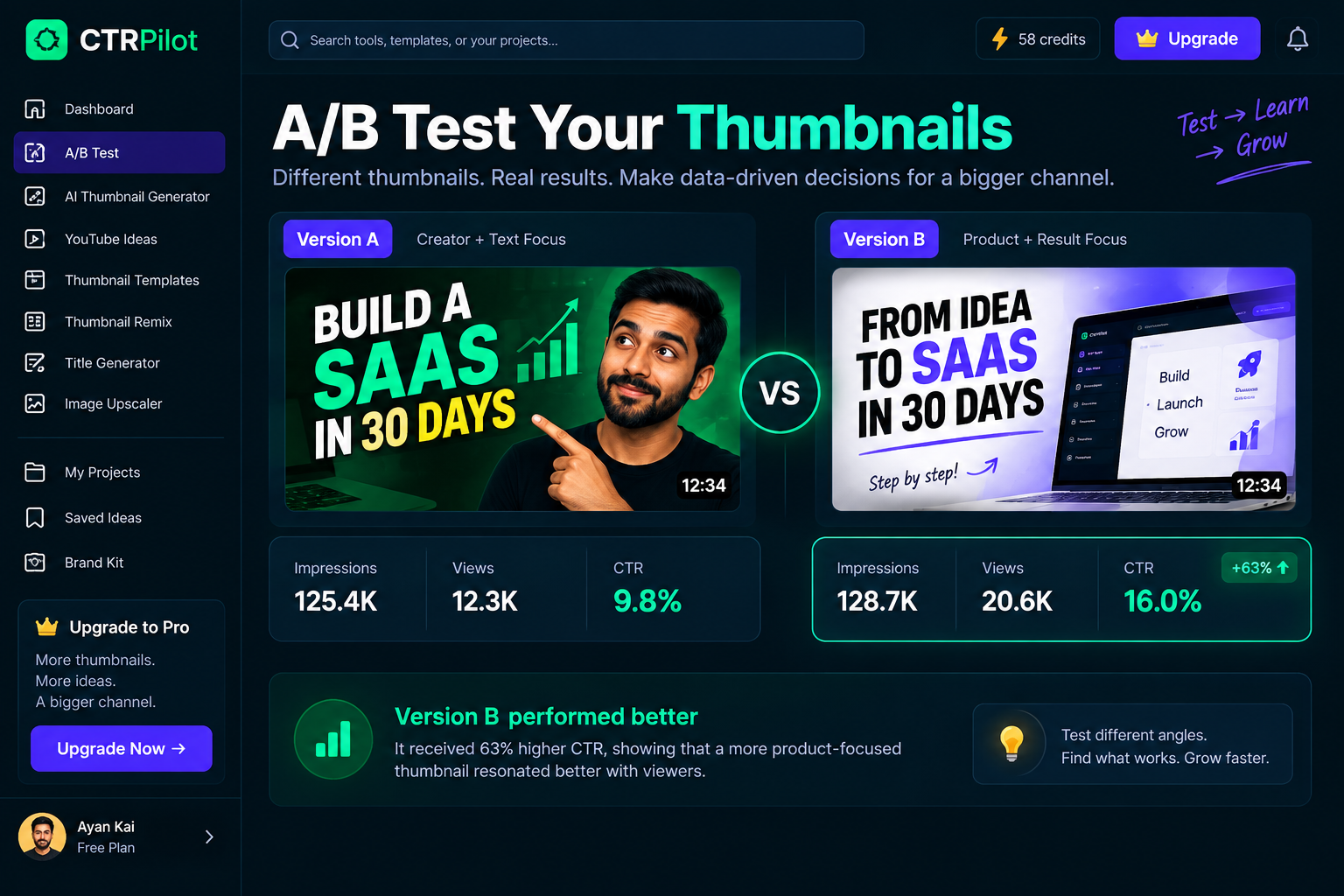
Two thumbnail variations can tell the same story in completely different ways.
For YouTube thumbnails, you might create:
Version A
A creator’s face + large text + growth chart
Version B
A large result number + product screenshot + minimal text
Both represent the same video.
But they tell the story differently.
If you can test these variations with your audience, you can learn which presentation generates stronger engagement.
Small Changes Can Create Big Differences
You don’t necessarily need to completely redesign a thumbnail.
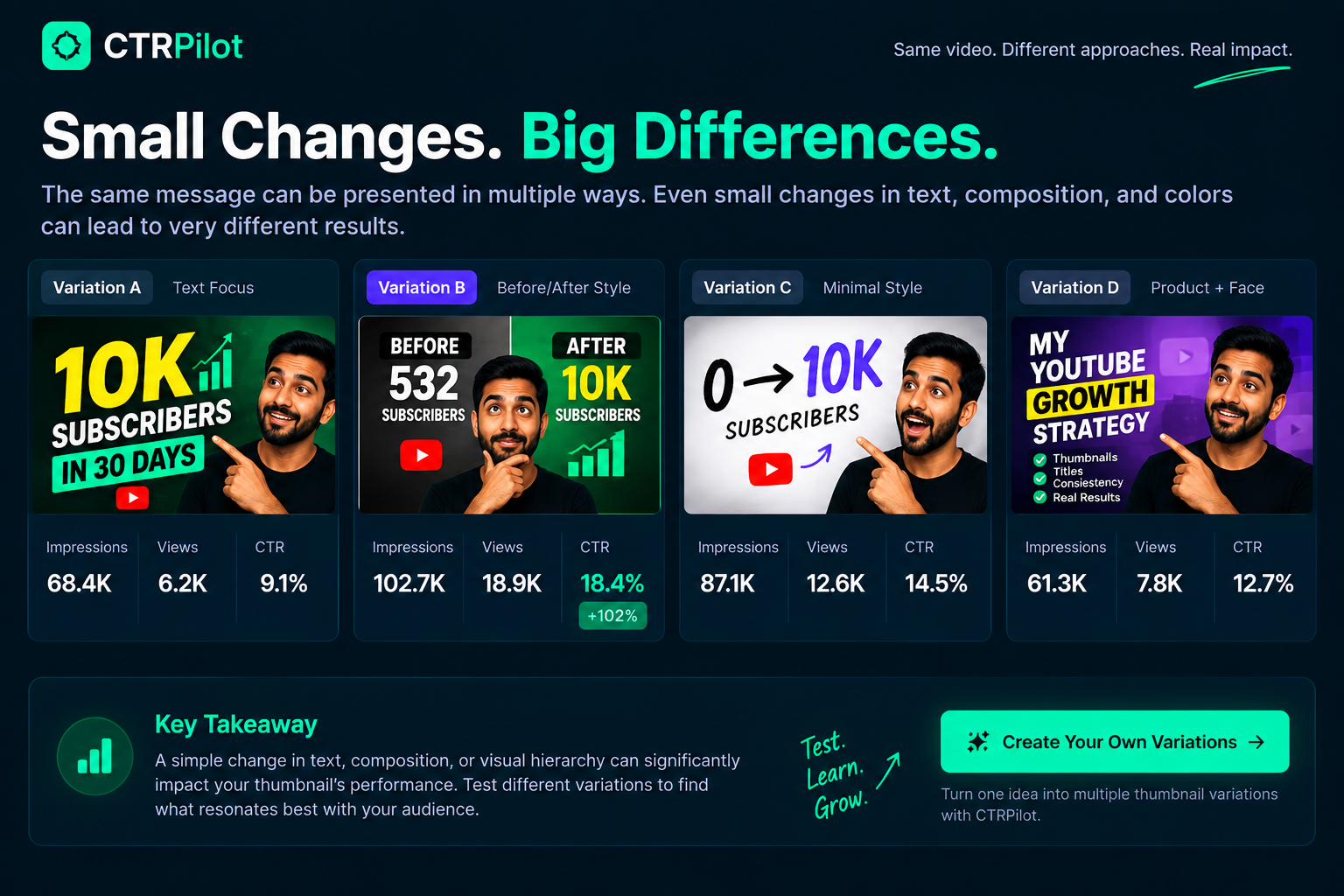
Small changes in text, composition, and visual hierarchy can create meaningful differences in how a thumbnail is perceived.
Sometimes the difference can be surprisingly small.
For example:
Version A
10K SUBSCRIBERS
Version B
0 → 10K
Same basic message.
Different visual framing.
Or:
Version A
Creator’s face on the left.
Version B
Creator’s face on the right.
Or:
Version A
Dark background.
Version B
High-contrast background.
The point of testing is to discover which variation communicates the idea more effectively.
Don’t Test Everything at Once
There’s a temptation to change everything between versions.
Different colors.
Different fonts.
Different images.
Different layouts.
Different text.
That can make it difficult to understand what actually influenced the result.
A more controlled experiment might change one major variable at a time.
For example:
Test 1: Different headline
Test 2: Different image
Test 3: Different composition
Test 4: Different emotional expression
This creates more useful learning over time.
Start With a Hypothesis
Good experiments don’t start randomly.
They start with a question.
For example:
“Will a shorter headline make this thumbnail easier to understand?”
That’s a hypothesis.
You create two versions.
Then you compare the results.
Another hypothesis might be:
“Will showing the final result more prominently create more curiosity?”
Again, create variations and test them.
This turns thumbnail design into a learning process.
CTR Is Only One Part of the Story
Click-through rate is an important metric for understanding how often people choose to click after seeing a video impression.
But creators shouldn’t think about CTR in isolation.
A thumbnail might generate curiosity but attract viewers who aren’t actually interested in the video.
That can create a mismatch between the packaging and the content.
A strong thumbnail should attract the right viewer, not simply the maximum number of clicks.
That’s why the thumbnail needs to accurately represent what the video delivers.
Thumbnail and Title Should Be Tested Together
A thumbnail doesn’t exist by itself.
It’s paired with a title.
Consider:
Thumbnail:
0 → 100K
Title:
How I Grew My YouTube Channel From 0 to 100K
Now imagine another combination:
Thumbnail:
THE STRATEGY
Title:
The YouTube Strategy That Changed My Channel
Both combinations communicate a similar idea.
But they create different expectations.
Sometimes the best improvement isn’t changing the thumbnail alone.
It’s finding a better thumbnail + title combination.
Don’t Optimize for One Video Forever
A successful experiment isn’t only useful for the video you’re testing.
It can teach you something about your audience.
Maybe your viewers respond better to:
Large numbers
Human faces
Before-and-after visuals
Minimal text
Strong contrast
Result-focused designs
Over time, these observations can become part of your channel’s creative strategy.
One experiment becomes a lesson.
Several experiments become a system.
Build a Thumbnail Testing Library
Creators can make this process even more useful by keeping track of their experiments.
For each test, record:
Video topic
Thumbnail variation
Title
Hypothesis
Result
What you learned
After dozens of videos, you may start seeing patterns.
For example:
“Result-focused thumbnails consistently perform well for tutorials.”
Or:
“Long thumbnail text doesn’t work well with our audience.”
These insights can become incredibly valuable.
AI Makes Creating Variations Faster
The biggest obstacle to experimentation is often production time.
Creating five completely different thumbnail concepts manually can take a significant amount of effort.
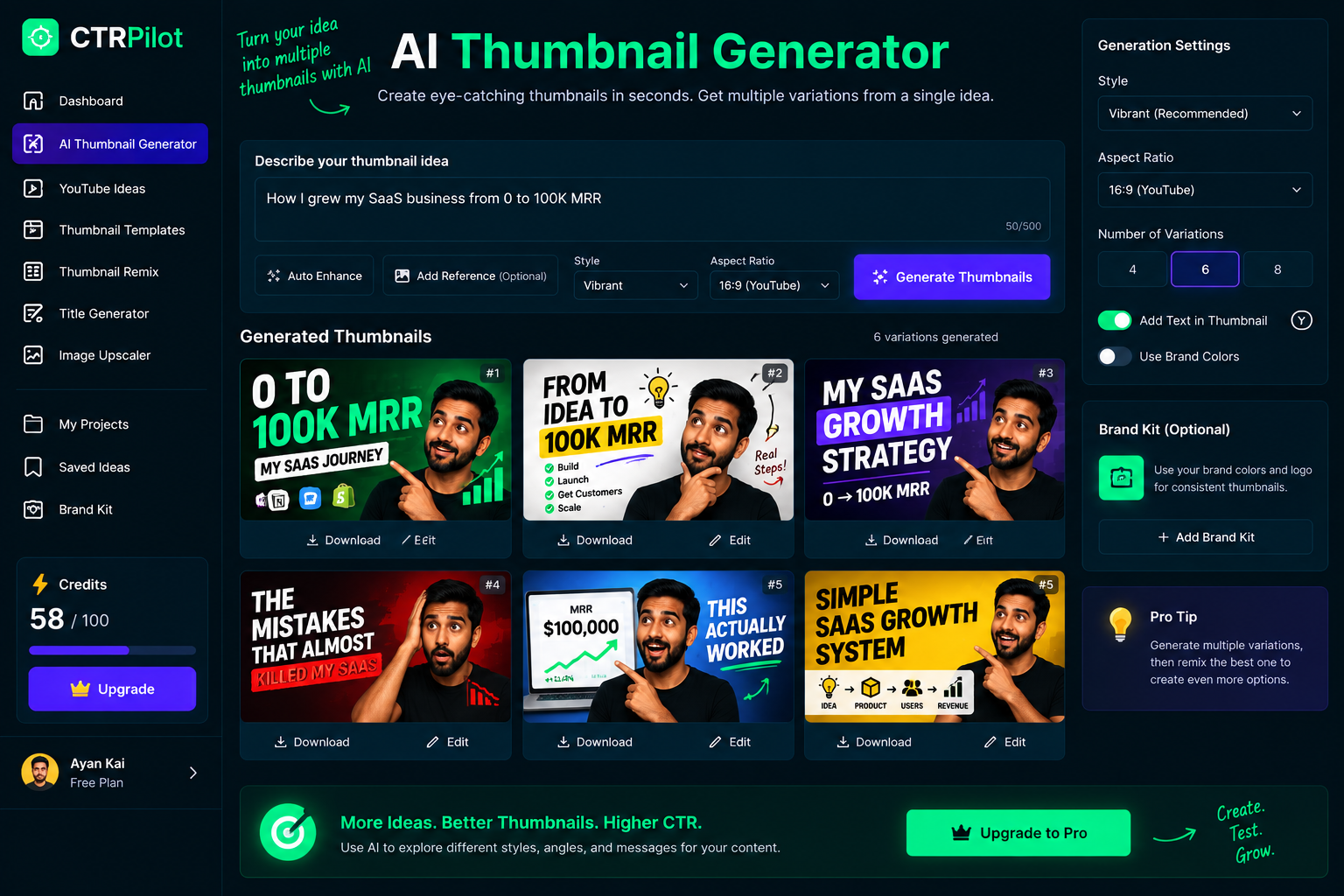
AI makes it faster to explore multiple creative directions from a single video idea.
AI can reduce that cost.
Instead of spending hours creating variations from scratch, creators can use AI to explore different concepts quickly.
For example, start with:
Video:
“How I Built a SaaS Product From Scratch”
Then explore:
Concept 1: Result-focused
Concept 2: Journey-focused
Concept 3: Problem-focused
Concept 4: Curiosity-focused
Concept 5: Minimal/product-focused
Now you have several creative directions to evaluate.
This Is Where CTRPilot Can Help
This experimentation mindset is one of the ideas behind CTRPilot.
The goal is to make it easier for creators to explore different ways of packaging the same content.
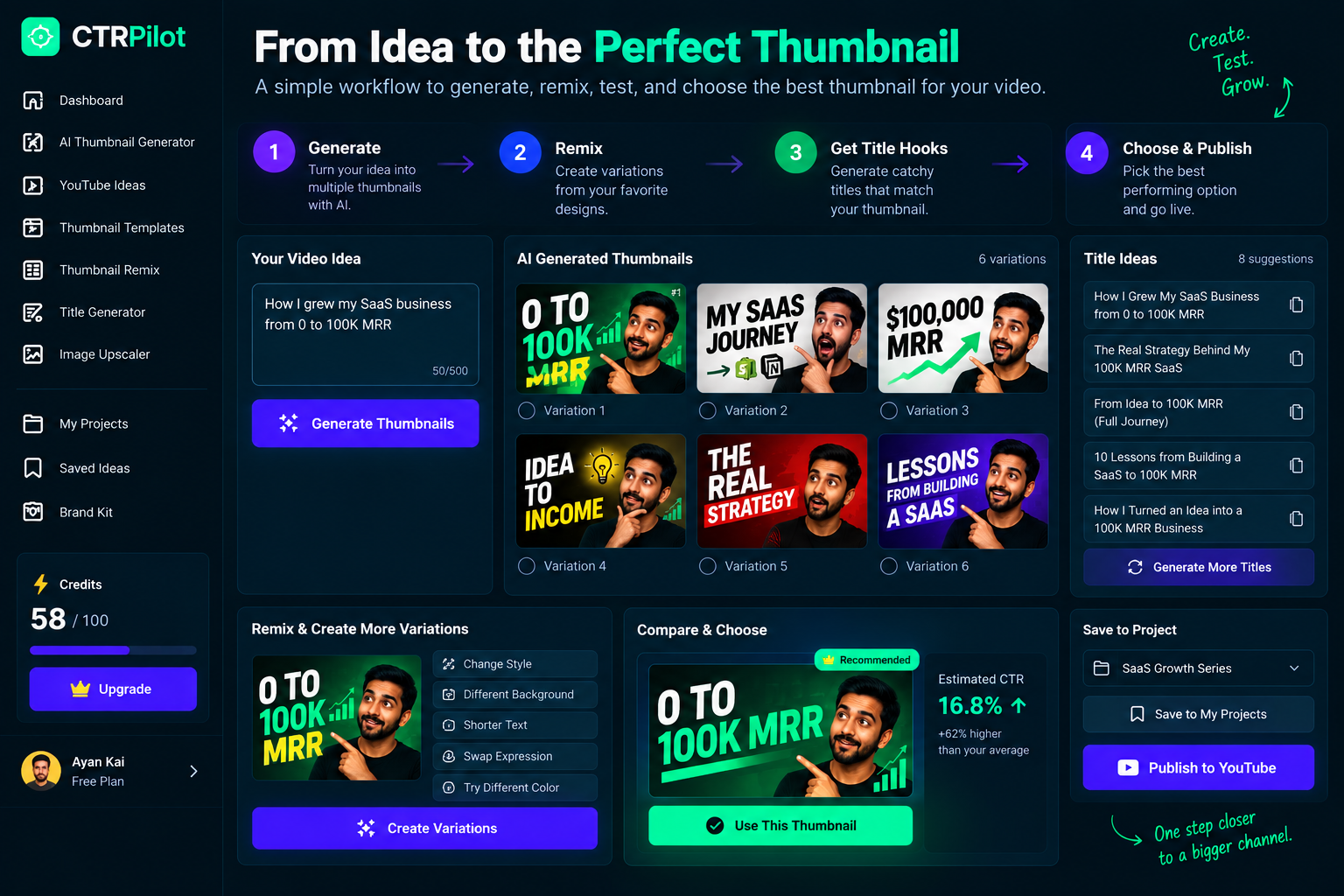
A focused workflow makes it easier to generate, refine, and compare thumbnail ideas before making a final decision.
With tools for AI thumbnail generation, thumbnail ideas, remixing, title hooks, and image enhancement, creators can move from one concept to several variations without rebuilding everything manually.
For example:
Start with an idea
↓
Generate thumbnail concepts
↓
Create variations
↓
Remix the strongest direction
↓
Generate title hooks
↓
Choose the best combination
The creator still makes the final decision.
AI simply makes the exploration process faster.
Remixing Is Especially Useful for Testing
Imagine you already have a thumbnail you like.
Instead of starting from a blank canvas, you can create variations from that existing concept.
Try:
A different composition
A shorter headline
A stronger visual subject
A different background
A more dramatic expression
A cleaner layout
Now you’re not asking:
“What should I design?”
You’re asking:
“What happens if I change this?”
That’s a much more useful question for experimentation.
A Simple Testing Framework
If you want to start experimenting with thumbnails, keep it simple.
Step 1 — Pick an important video
Choose a video where improving packaging could make a meaningful difference.
Step 2 — Create two or three concepts
Don’t create twenty.
Start with a manageable number.
Step 3 — Define the hypothesis
Know what you’re trying to learn.
Step 4 — Keep the core message consistent
Make sure every variation still represents the same video accurately.
Step 5 — Measure performance
Look at the relevant analytics available to you.
Step 6 — Document the result
Write down what worked and what didn’t.
Step 7 — Apply the learning
Use the insight when creating future thumbnails.
The Goal Isn’t to Chase a Perfect Thumbnail
There may never be a universally “perfect” thumbnail.
Audience behavior changes.
Topics change.
Competition changes.
Trends change.
What works for one channel might not work for another.
That’s why a better goal is:
Keep learning.
Every experiment gives you more information about your audience.
And more information leads to better decisions.
From Guessing to Learning
There’s a major difference between these two workflows:
Guess → Publish → Move on
and:
Hypothesis → Create variations → Test → Learn → Improve
The second approach turns content creation into a continuous feedback loop.
You aren’t just producing videos.
You’re learning how your audience responds to different stories, visuals, and ideas.
Final Thoughts
YouTube thumbnails are creative assets — but they’re also communication tools.
And communication can be improved through experimentation.
You don’t need to test every detail.
You don’t need dozens of variations.
You don’t need to completely automate the creative process.
Start small.
Create alternatives.
Ask better questions.
Look at the data.
Then use what you learn in the next video.
That’s where AI becomes especially interesting.
It can reduce the time required to explore creative possibilities, while the creator remains responsible for the strategy and final decision.
Create. Test. Learn. Improve.
That’s a much more sustainable way to build a YouTube channel.
👉 Explore CTRPilot: CTRPilot